
Tracking Clicks on External Links as a Goal in Google Analytics
Measure clicks on outbound links as a goal in Google Analytics: one simple route with your own Javascript and an even simpler one through a plugin.

This article is also available in German.Read the German version
Sometimes you want Google Analytics to count clicks on external links as a goal. It can happen that a signup for an external newsletter cannot be tracked the usual way through a local thank you page, so you settle for measuring the click on the newsletter link as the goal instead. There is a simple solution for that and a very simple one.
All the link needs is a piece of Javascript that records the click in Google Analytics as an event. After that you define the event as a goal, and clicks on external links are measured. The precondition, of course, is that Google Analytics is already installed correctly on the site.
Adding the event tracking by hand
In the Javascript below you only adjust the target address, then add the whole snippet to the link. From then on the click is recorded in Google Analytics as an event.
<a title="newsletter" href="http://www.newsletter.com"
   onclick="javascript:_gaq.push(['_trackEvent','outbound-article','http://www.newsletter.com']);">newsletter</a>
Tracking every click on external pages automatically
I recommend the Google Analytics for WordPress plugin by Yoast to anyone on WordPress. It makes life with Google Analytics so much easier, and it is free on top. Event tracking for clicks is switched on by default, and many further options are a few clicks away. The Javascript it produces is the same as above.
Next you only have to turn the click on the link into a goal.
- Create a new goal and give it a name.
- Choose the goal type Event.
- Set the category to "is equal to" and "outbound-article".
- Set the action to "is equal to" and "http://www.newsletter.com".
- Leave label and value empty.
- Set the goal value to zero or to any monetary value you like.
- Save and you are done.
Here is the same thing as a screenshot:
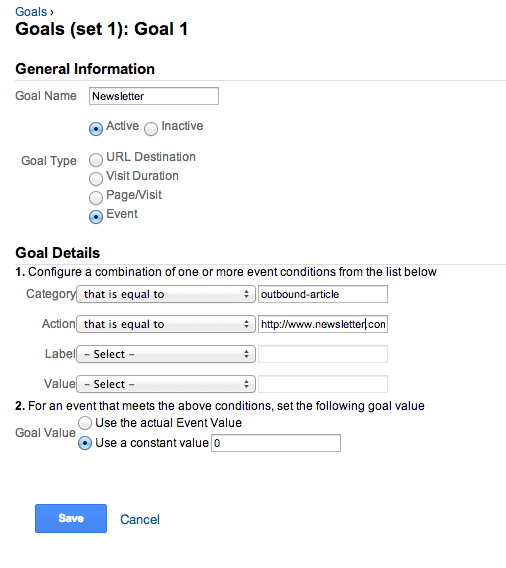
From now on, clicks on outbound links are measured as goals too.